Explain without switching tools
Draw with pen, highlighter, arrows, lines, boxes and ellipses over your current desktop. A permanent Mouse button returns to ordinary clicking and typing from every tool page.
XERR Windows application · annotate and collaborate
Keep using PowerPoint, spreadsheets, PDFs and your other applications. A compact native toolbar adds branded drawing and styled text, a visible cursor, interactive hotspots, recording, offline English transcription and a secure collaboration room.
Explore four real software screens at your own pace. Optional narration loads only when you choose to listen.
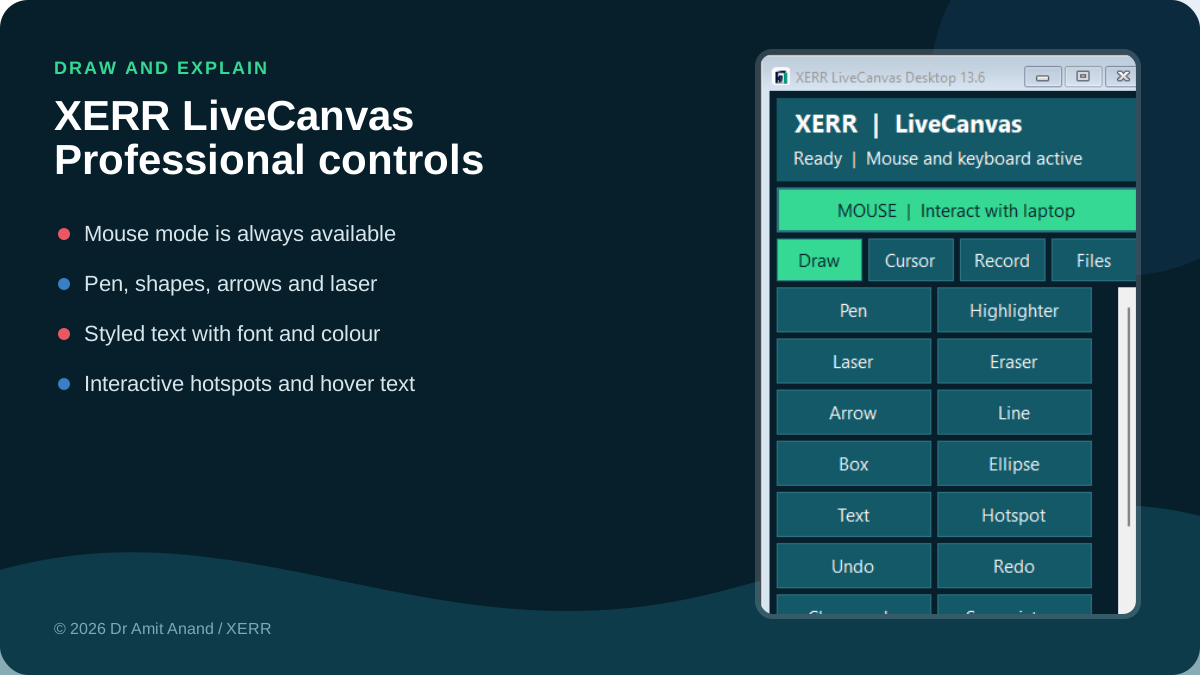
The actual 13.6 drawing controls with permanent mouse mode and professional XERR styling. Actual software screenshot; illustrative content. Select the image to inspect it at full resolution.
Use XERR LiveCanvas 13 in the Windows Start menu. Once it opens, right click its running taskbar icon and choose Pin to taskbar. The download named Setup is only for installation.
Shortcut opening the installer? Repair an original fallback shortcut. ZIP alternative.
This optional helper is retained for original fallback files; it repairs their Desktop and Start shortcuts and opens the application. It does not install, download or alter LiveCanvas. Your organisation may require approval for unsigned applications.
Draw with pen, highlighter, arrows, lines, boxes and ellipses over your current desktop. A permanent Mouse button returns to ordinary clicking and typing from every tool page.
Choose font family, 10–72 px size, regular, bold or italic styling, text colour and optional background or border. Edit the most recent text without starting again.
Adjust cursor colour, size and transparency. Choose a filled circle, ring or arrow, or use the independent laser pointer.
Hotspots can open websites, secure meeting links, documents, pages, slides, bookmarks and folders; show hover text or notes; copy text; prepare email; run checklists or timers; reveal answers; preview images; or add recording timestamp notes.
An approved participant can present their own screen while everyone continues using camera, microphone or headphones, chat, links, reactions and temporary file exchange. Viewers can use full screen.
Record a screen or window, voice, webcam or screen with webcam. Review files, create offline English transcripts and subtitle exports, and package the useful session outputs.
Use your normal presentation, document, spreadsheet or other application.
Use the native toolbar to annotate, highlight, trigger hotspots or record a selected screen/window.
Review the transcript and timestamped notes, then export them or import the transcript into LiveCanvas Pro.
Project reviews, client demonstrations, training, planning sessions, walkthroughs, design reviews and recorded explanations across any industry.
Windows 10/11 desktop compatible with x64. Microphone, webcam, system audio mix and managed client policies require checks on the target laptop. Protected content and secure Windows screens are outside the supported capture surface.
PRACTICAL ANSWERS
Check the fit with your team and your organisation’s requirements.
Version 13.6 targets Windows 10 or 11 on x64. Check the exact client laptop, display setup and required devices.
The installer is unsigned and may be blocked by corporate policy or Windows protections. Obtain IT approval. Do not disable security controls.
Recordings and annotations are kept locally by the installed application. Use its Files and export controls to retain your own copies.
The core drawing, recording and English transcription tools run on the Windows desktop, and transcription is offline. The secure collaboration room requires internet access and a modern HTTPS browser.
Device permissions, protected content and secure Windows screens can restrict capture. Get permission before recording people or confidential information. Automatic transcripts need review.
No. Participants can share their own screen in the XERR room, but nobody receives remote keyboard or mouse control of another person’s device.
© 2026 Dr Amit Anand / XERR. All rights reserved. Software ownership and licence notice.